AI & Revenue Operations
Can an AI Agent Build a HubSpot Campaign? I Tested It
I connected Claude Code to HubSpot through MCP and asked it to prepare a B2B marketing campaign. Here's what it managed to build, what reached Marketing Studio, and why its audience analysis needed a second look.
An AI agent created a campaign in HubSpot, produced an invitation email and mapped out the remaining work. It also concluded that the target audience was empty.
That last finding was wrong.
When I checked the underlying CRM data, I found 12 potentially relevant contacts that the agent’s filters had excluded. The problem wasn’t a lack of audience. It was how the agent had translated the targeting requirements into HubSpot’s filtering logic.
The experience raised a bigger question about AI-assisted campaign building: how much of the campaign can an agent actually prepare, and how do you know whether the result is correct?
HubSpot is bringing campaign planning, content, automation and reporting together through Marketing Studio. It also supports external AI assistants through its remote Model Context Protocol (MCP) server, giving tools such as Claude access to supported HubSpot operations.
I wanted to see how those two experiences worked together.
The outcome was more useful than a simple success or failure. The agent handled much of the preparation well, created assets directly in HubSpot and identified several operational dependencies. But the campaign was nowhere near ready to launch, and some of its most consequential decisions needed independent verification.
What I tested
I used a HubSpot developer test account with synthetic CRM data and a fictional campaign for Calderwick Assure, a B2B company promoting an executive briefing.
The campaign targeted relevant compliance, risk, audit and operations professionals at UK and Irish organisations. The brief included industry and company-size criteria, existing customer exclusions, open opportunities, registration requirements and sales follow-up.
This mattered because I didn’t want to test whether AI could produce a plausible campaign outline. I wanted to see whether it could handle the CRM and operational decisions that turn a campaign plan into something executable.
I connected Claude Code to the account through HubSpot’s remote MCP server.
The agent was given the campaign requirements, but not the answers to our prepared test cases or the implementation rules established in earlier manual testing.
It worked in two stages:
- Inspect the CRM and propose a campaign plan.
- Create the supported campaign assets after explicit approval.
I restricted the agent to the intended test account and approved draft-only writes. No messages were sent, nothing was published and no workflow was activated.
I then checked what existed in HubSpot, examined the result in Marketing Studio and compared the agent’s decisions against independently reviewed requirements and CRM records.
This was one supervised test, not a benchmark of AI agents or a client campaign. But it provided a useful view of where AI-assisted campaign development currently helps and where an operator still has work to do.
The agent was better at investigating the CRM than building the campaign
The first stage was encouraging.
Rather than starting with generic event marketing copy, the agent inspected the account and reported several issues that would affect campaign execution.
It found that most company records had no owner assigned. Only three contacts in the test account were marked as marketing contacts. The intended event subscription type hadn’t been configured, company geography wasn’t consistently represented, and there was no dedicated field for identifying competitor accounts.
It also raised 13 questions requiring decisions before the campaign could go live.
These findings were useful because they connected the campaign brief to the operating environment.
A team can agree on an audience, write compelling invitations and choose an event date without resolving who is permitted to receive the emails or what happens when an attendee needs sales follow-up. Those dependencies often emerge late, when implementation is already under way.
Here, the agent brought them forward.
It didn’t attempt to invent missing subscription permissions or fill in ownership decisions, which was appropriate.
But finding a dependency is different from handling it correctly. That became apparent during the build.
What the agent actually built
The agent successfully created a HubSpot campaign record and an associated invitation email draft.
It also produced a detailed specification for the remaining elements. However, several operations either failed or weren’t available through the tools and permissions exposed to this particular connection.
| Component | What happened | What remained |
|---|---|---|
| Campaign | Created in HubSpot with a planned status, audience, dates, owner and notes | Review and completion of campaign context |
| Invitation email | Created as an editable draft, associated with the campaign | Sender, footer, final copy, links and approval |
| Audience segment | Rejected by HubSpot because its filter structure wasn’t valid | Corrected and verified segmentation |
| Landing page | Blocked by the connector’s permissions | Page creation and configuration |
| Registration form | No creation tool available in this connection | Form and registration process |
| Automation and sales handoff | Agent supplied a specification | Working, tested workflows and ownership rules |
This is an important distinction: the agent did more than describe what someone should build. It created actual HubSpot objects.
But a campaign record and one draft email are still a small part of a functioning campaign.
The email itself was a starting point rather than finished creative. It contained placeholder links, incomplete sender and footer information, and content that still needed review.
The segment failure was also revealing. HubSpot rejected an invalid combination of filters, so the mistake didn’t result in a working segment. The agent stopped instead of retrying, as required by the test.
That was a useful technical safeguard.
Unfortunately, another targeting error was less obvious and wasn’t caught by the attempted configuration.
What appeared in Marketing Studio?
This was one of the main questions I wanted to answer.
HubSpot’s Marketing Studio (opens in a new tab) provides a workspace for planning campaigns, organising assets, working with automation and reviewing campaign activity. Its visual canvas and campaign brief are intended to make the wider campaign easier to manage.
The external MCP connection works differently. It exposes particular HubSpot operations to an AI assistant. It doesn’t automatically give the assistant the same editing capabilities as a person using every part of Marketing Studio.
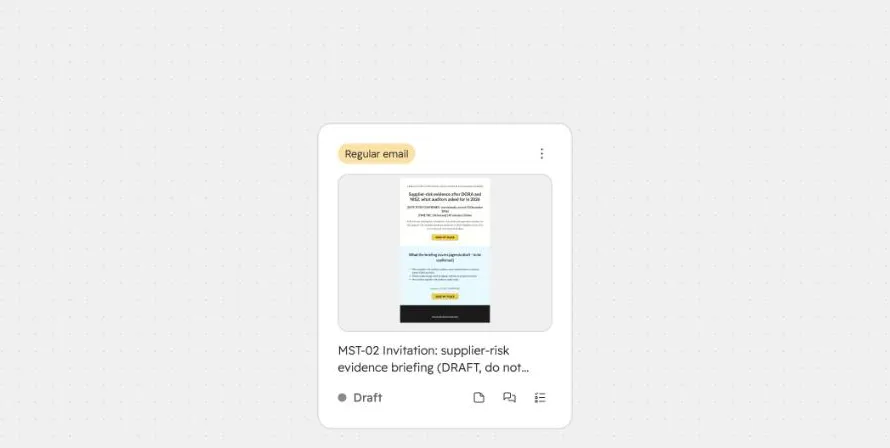
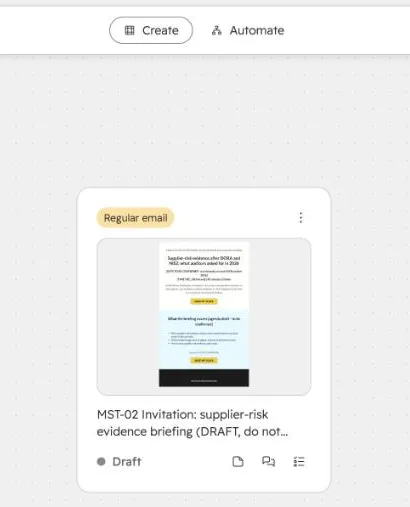
In my test, the campaign created through MCP appeared in the Studio campaign interface. The invitation email was visible as an editable draft on the canvas.
That is useful. An external agent can create an asset through MCP and a marketer can pick it up in the campaign workspace without having to rebuild it manually.
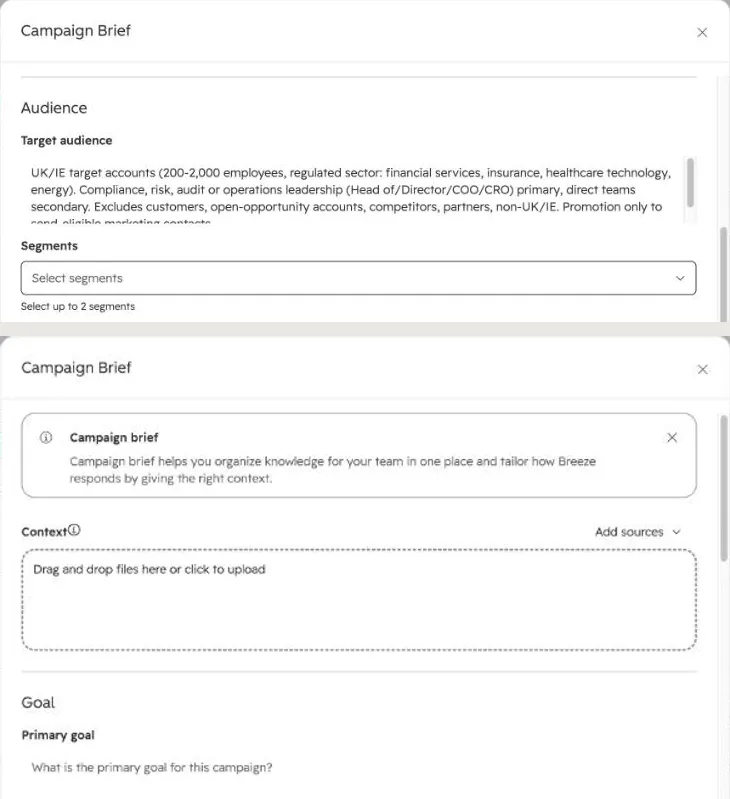
The campaign brief was a different story.
The target audience, owner and campaign period appeared as expected. However, the primary goal and supporting context were not populated in the equivalent Studio brief fields, even though the agent had written campaign information elsewhere in HubSpot.
The tools available to the agent couldn’t fully populate those fields in this run.
Why does that matter?
Because HubSpot’s Campaign Agent documentation (opens in a new tab) identifies the campaign brief and associated context as inputs used when developing plans and generating assets.
If an external agent creates a campaign but leaves important context outside the fields Studio uses, the handoff is incomplete. A human may need to review and fill those gaps before continuing with Studio’s own AI capabilities.
The external agent also hadn’t created a Studio-native automation or visual campaign sequence. Those remained separate implementation tasks.
One further observation deserves caution: the campaign interface displayed the associated email, but an API read-back returned no campaign assets through the endpoint checked. I couldn’t establish whether this discrepancy affected reporting, so I wouldn’t treat it as a demonstrated attribution problem.
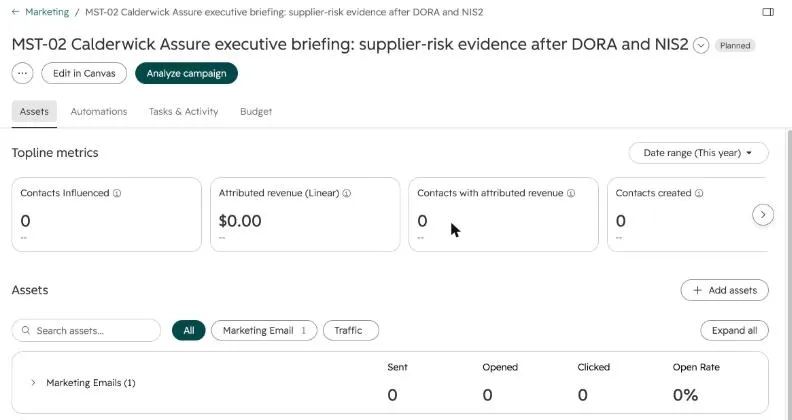
It reinforces a simpler point: when an agent says an asset has been created or associated, verify the result in the interface and through an appropriate read-back. Different surfaces may not tell the same story.
The targeting error that mattered most
The most consequential failure was the agent’s conclusion that the target audience was empty.
It had investigated the account thoroughly and was aware that some company fields were incomplete. Nevertheless, it constructed an exclusion rule that removed records with missing data.
The relevant conditions were equivalent to:
Company type is not PARTNER
AND
Company type is not RESELLER
In the observed filtering behaviour, companies with a blank type value failed those conditions.
All 12 contacts identified in the subsequent read-only check belonged to companies where that field was blank. They met the checked persona and target-account criteria, including relevant UK and Irish geography, but were excluded by the agent’s proposed logic.
The conclusion that no relevant contacts existed was therefore unsupported.
There was a second issue with its persona matching. The rule was broad enough to admit job titles such as Head of Marketing or Chief Revenue Officer, even though those roles weren’t necessarily within the campaign’s intended audience.
These were not failures of copywriting. They were failures in translating campaign policy into CRM logic.
And they illustrate two different risks.
First, an invalid filter can be rejected by the platform. That is what happened when HubSpot refused the proposed segment structure.
Second, a syntactically valid filter can still produce the wrong business decision. That is harder to detect, because the system may execute the rule exactly as configured.
The second risk matters more.
Audience relevance is not the same as email eligibility
There was another distinction in the 12-contact finding.
All 12 contacts were marked as non-marketing contacts in the test account. They therefore weren’t currently eligible for the planned HubSpot marketing email, even though they met the checked audience criteria.
HubSpot’s marketing contact documentation (opens in a new tab) makes clear that marketing contact status affects eligibility for marketing email and other marketing tools. Appropriate subscription permissions and other sending requirements must be checked separately.
So these two conclusions can both be correct:
- There are relevant people worth considering for the campaign.
- None of them can currently be sent the intended marketing email.
The agent had collapsed those into one decision.
For a marketing team, that mistake could lead to the wrong intervention. Rather than reviewing marketing-contact status, subscription configuration and the targeting policy, the team might incorrectly conclude that the marketable audience does not exist.
The appropriate response is not to change everyone’s marketing status automatically. It is to identify what prevents the proposed activity and determine whether there is a legitimate, authorised way to proceed.
That is why I would not approve an AI-generated audience based solely on a contact count or a confident explanation. I would want to see the actual criteria and representative records on both sides of the boundary.
What about automation and sales follow-up?
Campaign preparation becomes more complicated when engagement needs to produce a sales action.
For our executive briefing, different attendees required different treatment.
An existing customer might need to be routed to an account owner. An attendee with an active opportunity might need to be connected to the existing deal team. Two contacts from the same prospective account might warrant one coordinated follow-up rather than duplicate Leads and tasks.
The external agent recognised several of these requirements and wrote an implementation specification. But it didn’t configure the necessary automation through the MCP tools available in the session.
In a separate manual reference test of the same scenario, a company-based HubSpot workflow successfully generated one task when two eligible contacts from the same account attended. It also exposed an ownership issue: the task remained unassigned where the company lacked an owner.
That doesn’t establish that one task per company is always correct. Different buying initiatives may legitimately need separate follow-up.
It demonstrates why a campaign’s follow-up design needs explicit decisions about triggers, account relationships, owners and repeated engagement.
There is also a measurement consideration. HubSpot’s campaign influence rules (opens in a new tab) include enrolment in associated workflows and membership of associated segments among the conditions that can mark a contact as influenced.
Those associations should therefore be intentional. Campaign influence is not automatically evidence of a qualified sales conversation or revenue impact.
The agent can help identify these dependencies and draft the implementation logic. But the workflow still needs to be built, verified and accepted as a working part of the revenue process.
How is this different from HubSpot’s own Campaign Agent?
This test used Claude Code through HubSpot’s remote MCP server. It did not test HubSpot’s native Campaign Agent.
The distinction is important because the two approaches have different starting points.
HubSpot describes Campaign Agent as an AI experience built around campaign goals, audience context, brand information, campaign briefs and asset creation. It can propose connected campaign plans, generate draft content and recommend or create supported campaign automations.
An external MCP-connected agent operates through the tools and permissions exposed to its connection. In this test, those tools could create conventional campaign objects and an email draft, but they didn’t expose the full Studio canvas or automation experience.
| Native Campaign Agent | External AI through MCP | |
|---|---|---|
| Primary approach | Works from campaign and account context within HubSpot’s AI experience | Works through the HubSpot operations exposed to an external assistant |
| Campaign planning | Documented capability | Demonstrated in this test |
| Asset creation | Multiple draft asset types documented | Campaign and email draft created; other attempts were blocked or unavailable |
| Studio-native automation | Supported creation and recommendation paths are documented | Not available to this connection |
| Tested here | No | Yes, in one supervised reference exercise |
This isn’t a performance comparison. I didn’t run the same brief through both products.
It does show why teams should establish exactly which AI route they’re adopting. Saying that an AI assistant is connected to HubSpot doesn’t tell you what that assistant can inspect, create or configure.
How I would use an AI agent for campaign development
After this exercise, I wouldn’t abandon the idea of AI-assisted campaign building. I would change how I commission and review the work.
For a team considering this approach, three stages make sense.
1. Use the agent to investigate and prepare
Give it the campaign brief and ask it to inspect the relevant HubSpot environment before creating anything.
Have it identify the audience data, existing campaigns, account relationships, available tools, permissions and missing decisions.
Ask for a proposed sequence of assets and operational actions, with assumptions separated from verified facts.
This was the strongest part of my test. It produced a useful starting point for a human operator without requiring that person to inspect every CRM dependency from scratch.
2. Allow draft creation within a clear boundary
Once the plan is reviewed, let the agent create the supported assets.
Specify which campaign and asset types it may create, and distinguish drafts from actions that would affect real recipients or reporting.
Keep permissions and approvals proportionate to the impact of each action.
If the connection cannot create a form, workflow or particular Studio component, that is not a reason to improvise an alternative action without review. The agent should report what remains and who needs to complete it.
3. Verify the campaign before accepting the handoff
I would not judge the result by the number of assets created or the length of the agent’s implementation plan.
Instead, I would check six things:
- Campaign context: Are the goal, audience, positioning and intended conversion clear in the destination workspace?
- Audience correctness: Do the filters include and exclude the intended contacts, including records with missing or ambiguous fields?
- Communication readiness: Are marketing-contact status, subscription requirements, sender details and draft content appropriate?
- Operational completion: Which forms, workflows, ownership decisions and exception paths actually exist?
- Asset and measurement links: Are the assets associated correctly, and will the reporting count what the team intends to measure?
- Human takeover: Can another operator understand the campaign, resolve open decisions and safely continue the work?
The last point is easily overlooked.
A campaign assembled through AI isn’t particularly useful if it depends on the original agent to explain every choice or reconstruct what happened.
The deliverable should be a campaign that a person can inspect, challenge and operate, not just a successful sequence of tool calls.
When is this approach actually worth it?
There is a practical trade-off.
The agent’s account investigation and first specification were useful, but I didn’t establish a measurable time saving. Setting up and isolating the connection, defining permissions, checking the output and reviewing failures all required work.
For a simple campaign with one email and a landing page, a marketer already familiar with HubSpot might reasonably decide that using the normal interface is faster.
The case becomes more interesting where campaign preparation involves substantial CRM context: several target segments, existing account relationships, exclusions, multiple asset types and a complicated handoff to Sales.
In that situation, an agent that can inspect the environment, identify dependencies, prepare drafts and document unresolved work may provide value even without building everything autonomously.
The important consideration is whether the saved preparation effort exceeds the effort needed to supervise and verify the agent.
This test doesn’t quantify that trade-off. It shows where the potential value lies and which errors could undermine it.
So, can an AI agent build a campaign in HubSpot?
It can build part of one, and that part can be genuinely useful. But I wouldn’t equate it with a completed campaign.
In this test, Claude Code connected to HubSpot, investigated the CRM, prepared a coherent plan and created a campaign with an invitation email draft. That work appeared in Marketing Studio and could be continued by a human operator.
It didn’t build the registration process, create a working segment, configure the sales handoff or prepare the campaign for activation. And its audience analysis demonstrated that detailed reasoning can still produce an incorrect operational conclusion.
The lesson isn’t that AI should stay away from marketing operations. Nor is it that every campaign needs elaborate engineering controls.
It’s that AI-assisted campaign building is useful when it shortens the path from an idea to a verifiable campaign, without bypassing the decisions that make the campaign work.
For marketing and revenue operations teams, that is the distinction worth paying attention to.
The question isn’t only what an agent can create in HubSpot. It’s what the team can confidently accept, correct and operate once the agent has finished.